" opacity=".1"/%3E%3Cpath fill="none" stroke="url(%23c)" stroke-linecap="round" stroke-width="54" d="M75 320q181-265 362 0"/%3E%3Cpath fill="none" stroke="url(%23d)" stroke-linecap="round" stroke-width="40" d="M80 315q176-257 352 0" filter="url(%23e)"/%3E%3Cpath fill="none" stroke="%23fff" stroke-linecap="round" stroke-width="6" d="M110 300q146-215 292 0" filter="url(%23e)" opacity=".7"/%3E%3C/svg%3E)
Containers. VMs. Sandboxes.
Without the chaos.
The blazing-fast Docker Desktop alternative. Run containers at lightning speed, spin up Firecracker VMs, and sandbox AI agents—all in complete isolation.
Requires macOS 15+ on Apple Silicon. Free forever for personal use. Business & commercial usage free during beta.
Fully open-source.
Not just a README.
Some projects have GitHub repositories, host a README, and include a few screenshots. ArcBox Desktop is different.
We are committed to being truly open source. We open source every line of code, every build script, every test — it's all on GitHub. Star it, fork it, audit it, contribute to it.
Full source code
Not just binaries and a README
Actively maintained
Frequent commits, fast response
Open contributions
PRs welcome, community-driven
Battery included
Tests, docs, and build scripts
arcboxlabs/arcbox-desktop
Public repository
Run AI agents locally.
Fully isolated from your system.
AI agents are powerful—and unpredictable. ArcBox Desktop runs your local agents in fully isolated Firecracker microVMs, so they can do their work without ever touching your host machine.
No host access
Agents run inside their own microVM with a strict boundary between the sandbox and your system.
Full observability
Watch every syscall, network request, and file write as it happens in real-time.
Instant spin-up
Spin up a fully isolated agent environment in under 125ms with a single command.
$ abctl sandbox create my-ai-agent
Creating isolated Sandbox...
├─ Memory: 2 GiB allocated
├─ Network: bridge
└─ Filesystem: Read-only rootfs
✓ Sandbox ready in 114.5ms
▊
Even if OpenClaw goes rogue,
your machine is untouched.
When you run OpenClaw inside ArcBox, the model operates inside a hardened Firecracker microVM. Network, disk, and I/O are completely severed from your host—so no matter what the model tries to do, it can't reach your system.
Network
Isolated outbound access. OpenClaw can't exfiltrate data or phone home.
Disk
A scoped, ephemeral filesystem. Your private files are never exposed.
I/O
Strictly audited device I/O. No keyboard sniffing, no clipboard access.
Process
Full syscall filtering with no escape.
The superpowers are endless.
Run containers
at lightning speed.
Docker-compatible containers that start in milliseconds, not minutes. No bloated VMs, just pure native performance.
Firecracker microVMs.
Spin up lightweight VMs in under 125ms. Perfect for isolated workloads with minimal overhead.
Sandboxed execution.
Run untrusted code safely in complete isolation.

Apple Silicon native.
Built from scratch for M1, M2, M3, and M4 chips.

Dev Containers.
Coming Soondevcontainer.json support for reproducible dev environments is on the way.

Security first.
Hardened by default. No network access unless you explicitly allow it.
That's all. Except not.
Ready to switch to
ArcBox Desktop?
Faster and lighter, built for the way you actually work
Requires macOS 15+ on Apple Silicon. Free forever for personal use. Business & commercial usage free during beta.
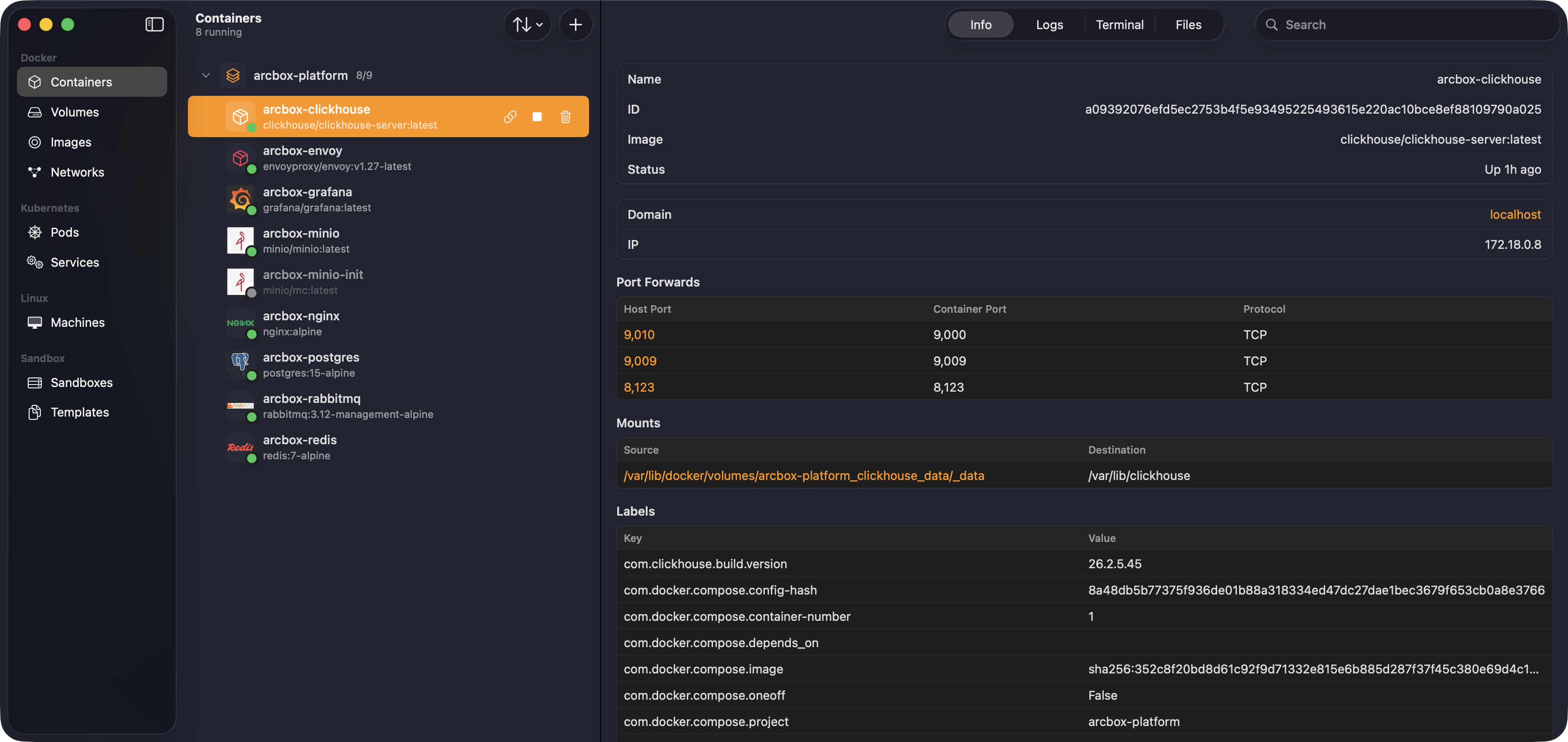
$ docker-compose up -d
[+] Running 9/9
✔ Container arcbox-rabbitmq Started 1.7s
✔ Container arcbox-clickhouse Started 1.1s
✔ Container arcbox-minio Healthy 12.1s
✔ Container arcbox-postgres Started 1.9s
✔ Container arcbox-redis Started 1.3s
✔ Container arcbox-minio-init Started 12.6s
✔ Container arcbox-grafana Started 2.2s
✔ Container arcbox-nginx Started 3.1s
✔ Container arcbox-envoy Started 3.8s